Showing posts with label DataBasin. Show all posts

Thursday, December 31, 2020

DataBasin 1.1 S released

DataBasin 1.1S and DataBasinKit have finally been released, after a long time-span.

This release is dedicated to my late friend and colleague Steven Rovelli (hence the "S" in the release name) who parted from us too young. He was an enthusiastic user of DataBasin and used and supported it inside our company, for countless AMS tasks. COVID-19 carried him away and he will be sorely missed.

This release is marks also the move from the GAP svn repository, to standalone projects on GitHub.

DataBasin sports some interesting news:

  • Improved interface with ComboBoxes to select update/insert objects and preferences to filter out more system objects
  • remember last successful login username
  • getUpdated / getDeleted
  • Undelete
  • Improved support for sub-objects and lists and unpacking (from DataBasinKit), this allows for example to use sub-queries, provided the related object is one (LIMIT 1)
  • support for enabling Assignment Rules in create/update

The core DataBasinKit has also many improvements,, some of them are not completely appreciated from the GUI interface, but useful for other programs wishing to use the API:

  • enhanced and rewritten handling of sub-objects and object-lists in query results: this allows to have SObject lists interpreted as such when using subqueries.
  • getUpdated and getDeleted
  • undelete
  • possiblity trigger Assignment Rules in create & update

Thursday, July 12, 2018

DataBasin + DataBasinKit 1.0 released

A new release (1.0) for DataBasin and its framework DataBasinKit is out!

This release provides lots of news, most of the enhancements coming from the framework and exposed by the GUI:
  • Update login endpoint to login.salesforce.com (back again!)
  • Implement retrieve (get fields from a list of IDs, natively)
  • Support nillable fields on create
  • save HTML tables and pseudo-XLS in HTML-typed formats
  • Fix cloning of connections in case of threading
  • Implement Typing of fields after describing query elements (DBSFDataTypes)

DataBasin is a tool to access and work with SalesForce.com. It allows to perform queries remotely, export and import data, inspect single records and describe objects. DataBasinKit is its underlying framework which implements the APIs in Objective-C. Works on GNUstep (major Unix variants and MinGW on windows) and natively on macOS.

Saturday, June 25, 2016

DataBasin - object inspector and updates

First, the underlying DataBasinKit framework got an important update.
[DBSoap update] now supports setting fields to null. That was quite a major detail missing: you could reset to blank even string fields.
This required me to fiddle a bit to generate the fieldsToNull list. Every field passed with an empty string value is considered to null.

<update xmlns="...">
<sobject xsi:type="sf:Account">
<id>....</id>
<fieldsToNull>AccountNumber</fieldsToNull>
<fieldsToNull>OtherCity</fieldsToNull>
<Name>New Name</Name>
</sobject>
</update>


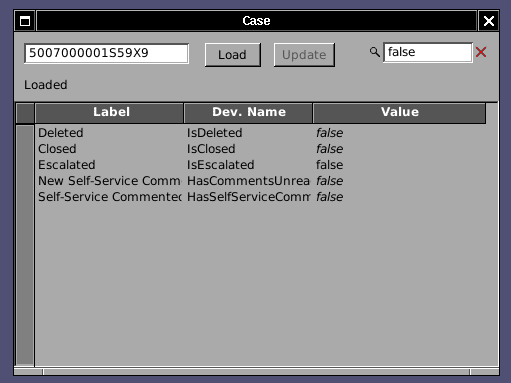
The Object Inspector, the handy tool which allows you to inspect all field values of a record and knowing immediately their developer name given the Object Salesforce Id, how got update powers!


As the Screenshot (here on MacOS) shows, changed values show in a different color (non-updatable fields show in italics and their Cell is not editable). The total number of fields to be changed is summed up in the status field. Only fields marked as changed are updated when the Update button is pressed, other are left as-is and not overwritten for safety.

Further work has been done in the Inspector and full search filtering is now available!
Just entering a a sting will filter out the relevant rows. Both the Field Name or Developer Name are matched, as well as the content! It is thus super-easy to look for all fields (also fields not at layout) which have a certain Value. All fields false? easy as in the screenshot:


Tuesday, May 17, 2016

DataBasin and DataBasinKit 0.9 released

After more than a year of work, finally a new release of DataBasin and its associated framework. This version features a Framework that can be used in threads and the application itself is capable of having concurrent connection classes to SalesForce.com.

On Windows

On OpenBSD


Countless bug fixes (thanks to the bug reports of my colleagues Diego, Moustapha, Matteo + Matteo).

Major new features are:
  • threadable DataBasinKit framework
  • concurrent, interruptible operations (e.g. select vs. update)
  • handle multiple errors as a result of update
  • filter new lines when writing CSVs
  • countless bugfixes, especially in select-identify corner cases

DataBasinKit allows you native connection to SalesForce.com, allowing your application to integrate SOQL queries (SELECT, UPDATE similar operations), be it on Mac (Cocoa) or NetBSD, FreeBSD, OpenBSD, Linux or Solaris as well as Windows (MinGW).
DataBasin itself allows you to perform standard operations in a quick and agile interface: Extract accounts on Linux without the need of Java. Use the unique select-identify feature.

I am proud that Free Software can connect from a Free Software Operating System to a proprietary system and bridge the two worlds, enabling to do administrative work without being constrained to Java on Windows (read: DataLoader). Thanks to the many developers who continue supporting me in the development and keep these fine Operating Systems and tools alive.

Monday, September 28, 2015

Nasty DataBasin bug fixed

DataBasin's Select-Identify, an invaluable tool for many working with salesforce.com, showed erratic behaviour: extremely hard to reproduce even by sometimes re-running the same query on the same data set, the operation would just stop without any error in the console log, trapped exception or else.

After extensive debugging I found the problem in the queryMore method of the API implementation in DataBasinKit. If queryMore had to return just one record, it would malfunction.
Technically this happened because the size reported by Salesforce.com in the queryMore is not the size of the objects of the queryMore, but of the original query.

The problem affects thus anything using queryMore: If you would select and had a batch size in download of 500, you would get a problem with 501, 1001, 1501 records and so on. 500 or 502 would just work fine. Combine this that the query size of the selectIdentify is dynamic and you get the idea on how difficult it was to reproduce.

Now it is fixed and the upcoming 0.9 version will have this fixed. All currently released DataBasin versions are affected by this bug.

Friday, June 27, 2014

DataBasin: more powerful CSV writing for Select and Select-Identify

DataBasin, the clean-room impelmentation of a data extraction tool for SalesForce.com available for GNUstep and Mac just made a big leap forward!

If you have ever done a SELECT in salesforce.com, you might have noticed that the results are not ordered and that semi-joined fields ("." notation) are handled strange because a whole object is returned.

DataBasin extracts the  columns of the CSV file by checking the first row of the dataset and recursing on the field names of salesforce's response. The effects in DataBasin are the following:
  • The field order is not preserved
  • If a sub-object is queried, all those fields are grouped together in that object
  • If more than one field is queried on a sub-object and on certain record this object is missing, the number of columns between records is inconsistent: salesforce.com doesn't return the whole object and DataBasin iterates record after record in the sub-object, but if it it is totally missing, only one empty column will be written, not as many as needed
  • Capitalization of the column names doesn't get preserved (compared to the above issues, something really minor)

I added a new option available in write out fields in the order of the query.

This feature implies a more complex under the hood. For each record gotten in the response, the field names are reconstructed as before (e.g. by recursing inside sub-objects) and put in a Dictionary.

The original SOQL query is parsed and the field names extracted, then these names are used as keys for each record dictionary and written out.
  • Order preserved, also with sub-objects
  • Fields preserved and empty values are written even if whole sub-objects are missing
  • Case is preserved
This approach looks fine and comes with a relatively small performance penalty, however it is delicate because during parsing of the query, many naming subtleties of Salesforce.com needs to be inferred, that is, DataBasin tries to infer how the name in the Response will be:
  • field aliases
  • aggregate names with no alias, which are called progressively Expr0, Expr1
  • idiosyncrasies with aggregate functions. A field in a sub-objects is called Object__c.Field__c when in a regular query, but when used in an aggregate query, only Field__c is used, disregarding the join-depth
  • COUNT() vs.COUNT(Id)
I hope I have not missed any! in any case, enjoy!


This feature is available now both in Select and Select-Identify, since it is a problem of the CSV Write backend and enhances DataBasin operation usability greatly, bringing it on par with DataLoader.
Since DataLoader performces similar transformation and sometimes produces wrong results, I left this feature as optional with the flag "Write fields in query order".

Wednesday, April 30, 2014

DataBasin 0.7

DataBasin 0.7 is out!

If you need to query, update,  create data on SalesForce.com and are on a GNU/Linux, *BSD, Solaris system or MacOS-X... try it out! Do you need to perform a query having objects or IDs instead of a where clause? Select-identify will come handy for you.

Some of the news:
  • Save results of update and create in a results.csv file with succeess and failure
  • Progress monitor of operations shows time remaining 
  • The login panel shows a visual icon if login happened successfully or not
  • Progress monitor for Query, Delete, Insert
  • Select identify now supports ORDER BY
  • Internal core enhanced for Delete
  • Many bug fixes and clean-ups

Thursday, April 25, 2013

DataBasin: advanced SObject describe

I enhanced DataBasin object's describe. First, I do parse the RecordTypeInfo now, but that was the easy part.  Salesforce.com returns only the record type ID and name, but programmatically, this is not very useful. The important bit would be the Developer Name of each record type.

I enhanced the results by querying automatically the RecordType table, extracting the Developer Name, matching it through the RT Id and merging back the results, so that the resulting DBSObject has a complete Record Type information, totally transparent.

Sunday, March 24, 2013

DataBasin 0.6

DataBasin 0.6 released!
  • Support "." as Semi-Join
  • Select Identify works now with multiple columns (all in AND as condition)
  • Support LIMIT clause in Select Identify
  • Improved Exception catching and display for Select Identify
  • Object Inspector supports selection of items
  • Log window with selectable log level
  • Progress and estimated completion time displayed in Log
  • Remember logins
  • internal API improvement
  • vast 64bit and portability improvements
  • Support count and aggregate queries
Select Identify is now vastly improved. Supporting multiple columns and LIMIT, coupled together with the other improvements of this release, makes it an invaluable tool during support and maintenance of a Salesforce org. How else could you check the status of a lot of objects, say Cases or Accounts?
The object inspector is always handy too.

DataBasin allows you to work with SalesForce.com much easier and also from your favourite free OS  using GNUstep like any BSD or GNU/Linux or at need on Solaris or Macintosh.

Many thanks to my colleagues, Claudio and Paolo amongst them, for finding bugs and testing the 9 internal beta releases!

Thursday, July 12, 2012

DataBasin development: logger and semi-joins

I am working on two long-needed features of DataBasin, the open source application to extract and inspect data from salesforce.com

The first feature is rather simple: a log window which shows some informative or debug output usually thrown to the console. While on standard Unix we always have the terminal emulator open and all debugging is very convenient there, on mac and especially on windows it is inconvenient: DataBasin logged every output as an Event in the windows log. Quite painful.

A much more complex, interesting and long awaited feature is that DataBasin now supports semi-joins! In other words, one can reference a field of a referenced object with the dot notation (like: Case.Account.Name) exactly as in the Salesforce.com Data Loader. The objects are recursively scanned and flattened so that they can be written to the CSV file. The column names are generated through the descent of the object tree.
This feature required a much more flexible approach in the CVS writer core. This means that some regression bugs could appear... hopefully not.

This feature applies to all queries, including the Select Identify query tool.

As the parser was being rewritten and the supported API bumped to 25, it is now improved to handle Aggregate Objects, thus one can now issue the following SOQL query:

select count(id), status from case group by status

and get the expected result:
"Status","expr0"
"New","16"
"Closed","31"

I hope these features make DataBasin much more useful!

Friday, May 25, 2012

DataBasin 0.5

I'm pleased to release DataBasin 0.5.

  • quoted CVS support in reading
  • support for reading DOS/UNIX/MAC file formats
  • improved exception trapping and display
  • fixed bugs in create and updates
  • various fixes

Wednesday, November 02, 2011

DataBasin 0.4

0.4 is out!

Select Identify: Execute iteratively selects with given Ids or Unique Identifiers (no more Excel connector for this chore)

Select Http or Https as a preference for your connection (and it even works... http had a workaround due to sfdc stubborness which is now enabled only when necessary)

DataBasin at GAP

Friday, August 19, 2011

DataBasin 0.3

DataBasin 0.3 released!

New object inspector, bug fixes, improved character encoding...

DataBasin at GAP

Wednesday, March 16, 2011

DataBasin Object Inspector sorting


The fields are now sortable by Label and Developer Name. A little feature that was sorely needed within orgs with almost 500 fields per object!

This feature is currently not available in GNUstep.

DataBasin, Objective-C portable data access tool.

Thursday, March 10, 2011

DataBasin: object inspection


DataBasin now sports an Object Inspector which works in the easiest way possible: insert a SalesForce.com ID: DataBasin will try to attempt do determine the object type, automatically describe it and finally load the data.

How many times did you have the need to quickly inspect an Object of which you got the ID in an exception email? Or how many times did you have to inspect the value of a field not visible on the layout?

This new feature required some extension to the underlying API of DB: the Soap class now has an identifier method which looks for an ID in all objects returned by the Describe Global in the attempt to identify the object it comes from.

The coolest addition however is in the DBSObject class itself: it is capable of loading or refreshing the values of a set of fields or of all known fields. And behold, a finesse: when loading the value of all fields, the queries will be split into executable queries without reaching the maximum SOQL size of 10K chars, as opposed to Apex Explorer which chokes if you select all fields of a very big object.

Sunday, November 28, 2010

DataBasin 0.2

DataBasin v 0.2 was released, the free software, open source tool for working with Salesforce.com.

The core library was enhanced and new features were added.

Read more and download it from the DataBasin homepage.

Friday, June 25, 2010

First release of DataBasin


I'm pleased to announce the first release of DataBasin, a tool which allows to access Data on SalesForce.com using its WebService APIs. Core part of the tool is the API implementation in Objective-C, which uses the GNUstep WebServices for the low-level interaction.

The API implementation is designed to be reusable in other application and is LGPL'd.

Basic functionalities like Query, Insert and Delete are implemented (and of course log-in!) but the tool contains many rough parts, like the CVS importer/exporter so production use is not yet recommended.

As far as I know this is the only open source library for Salesforce.com, at least in Objective-C.

In the screenshot DataBasin running on Debian GNU/Linux.


A big thanks to many friends who helped me implementing the API and debugging the SOAP Calls. First of all Richard Frith-MacDonald who extended the GSWS to support SOAP in the first place. Then two colleagues, Andrea Rosa and Enrico Murru who helped track down many bugs.


Thursday, March 25, 2010

DataBasin gets Update and a new inspector


DataBasin, the SOAP data access tool for Salesforce of the GNUstep Application Project, got new features! Check the screenshot.

The SOAP layer was enriched with the update call. To perform an update the steps are identical to an Insert and the already existing object describe is use to retrieve the list of available objects. Currently, as with Insert, the CSV column titles need to match exactly the Salesforce fields.

Also, DataBasin got a new inspector about the user properties retrieved during login. These informations can be handy during development, like the ID of the Org, the User, its profile and role. They are exposed in Output-only fields with support for copy-paste to other applications

Tuesday, October 20, 2009

DataBasin and deletion of Salesforce records


I implemented delete in the Salesforce.com API Layer (DBSoap) of DataBasin.

The screenshot shows DataBasin running on the Mac, natively built in Xcode.

Delete is capable of deleting an array of records, on top of this I implemented a convenient function: QuickDelete. Just enter a Saleforce.com ID and delete it.

Full handling of the error results is still missing, currently only the verbose message are retrieved. For the QuickDelete an error gets conveniently displayed as if it were an exception in a small scrollable panel.


Friday, August 21, 2009

DataBasin is now able to create records in sfdc


DataBasin is now able to create records in SalesForce.com starting from a CSV file.

First, as shown in the screenshot, the already implemented method describeGlobal retrieves the available objects to insert into. Once the user selects them the CSV file is read and the objects get created. There is no provision yet for mapping the fields, the first line is assumed to contain the field names.

The API implemented by DBSoap is now getting a little more complete step after step. The basic operations of creation and query are already possible.