Sunday, December 15, 2019

ArcticFox 27.9.19 release

Arctic Fox 27.9.19 has been released!

Plenty of enhancements, still supports your trusty Mac from 10.6 up and Linux PowerPC!

Arctic Fox on Devuan amd64


Code has been fixed to support newer compilers. On Linux, currently, the highest supported compiler remains gcc 6.5, more recent versions do compile now with this release, but fail to link afterwards with errors on very standard symbols. Help appreciated! On NetBSD gcc 7 now works fine instead.


Tuesday, February 19, 2019

ArcticFox has working DevTools again

The past release of 27.9.15 ArcticFox has the Developer Tools working again, they were broken previously because of excessive work on Private browsing.

You can see them here in full action:


ArcticFox continues the work as a fork of PaleMoon trying to catch up with past releases of FireFox.
It has been succesfully backported up to MacOS 10.6 SnowLeopard, is working reliably on Linux x86, amd64 and PowerPC 32bit and 64bit.

If you like the browser, we need your help!

Thursday, February 07, 2019

GIMP 2.10.6 working on MacOS Leopard!

My white MacBook is a perfectly fine computer, has an excellent screen and keyboard (superior to later models I have) so even if it is running a legacy OS version, I'd love to continue using it and, perhaps, other of you are in the same situation.

Besides ArcticFox (which I got running on 10.6, but not on 10.5 yet) and various developer tools, the most essential tool I like to have is GIMP, also given the excellent LCD this Laptop has.

Some work from macports to get up-to-date tools and dependent libraries, I patched its package.

Little work was needed in GIMP itself, I shared all the patches upstream and I hope they will be accepted. The remaining issues are in GEGL, but different solutions are available: essentially realpath doesn't like a null argument.

Enjoy this screenshot as a proof.


Next question: will it work on PowerPC too? I hope so! Getting GIMP to work on 10.5 opens this possibility.

P.S.: this post was written directly on the MacBook i386 using TenFourFox running natively on Intel!

Wednesday, November 07, 2018

ArcticFox on 10.6

ArcticFox, currently in my own fork, succesfully compiles natively on MacOS 10.6 Snow Leopard and runs! 64 bit currently.
Great news for those who use older but still perfectly capable Macintoshes....

ArcticFox derives from PaleMoon 27 which in turn is FireFox derived.

I tried Facebook and even WebGL samples as this screenshot shows.


This Blog entry is written natively on my MacBook and ArcticFox.

Saturday, September 29, 2018

first release of StepSync!

I'm proud to announce the first release of StepSync, a file sync tool for GNUstep and MacOS (even for venerable PowerPC).

StepSync allows synchronization of folders, optionally recursively descending in sub-folders. It allows thus various options of performing backups: pure insertion, updates and including full synchronization by importing changes from target to source.

After months of development and testing, I consider it stable enough, I tested it with thousands of files and folders.

You can find it at the GNUstep Application Project. I already have plans for new features!

Friday, August 17, 2018

Graphos 0.7 released

Graphos 0.7 has been released a couple of days ago!

What's new for GNUstep's vector editor?
  • improved Bezier path editor (add/remove points)
  • Knife (Bezier Path splitting) instrument fixed and re-enabled (broken since original GDraw import!)
  • important crash fixes (Undo/Redo related)
  • Interface improvements to be more usable with Tablet/Pen digitizer.
Graphos continues to work on GNUstep for Linux/BSD as well as natively on MacOS.

Graphos running on MacOS:

Tuesday, July 17, 2018

Graphos GNUstep and Tablet interface

I have acquired a Thinkpad X41 Tablet and worked quite a bit on it making it usable and then installing Linux and of course GNUstep on it. The original battery was dead and the compatible replacement I got is bigger, it works very well, but makes the device unbalanced.

Anyway, my interest about it how usable GNUstep applications would be and especially Graphos, its (and my) drawing application.

Using the interface in Tablet mode is different: the stylus is very precise and allows clicking by pointing the tip and a second button is also possible. However, contrary to the mouse use, the keyboard is folded so no keyboard modifiers are possible. Furthermore GNUstep has no on-screen keyboard so typing is not possible.

The classic OpenStep-style Menus work exceedingly well with a touch interface:the menus are easy to click and teared-out they remain like palettes, making toolbars not necessary.
This is a good start!

However, Graphos was not easy to use: aside from typing text, with no keyboard, several components requried typing (e.g. inserting Line Width).
I worked on the interface so that all these elements also had a clickable interface (e.g. Stepper Arrows). Duplicating certain items available in context-menus in regular menus, which can be detached, provided also an enhancements.
Standard items like the color wheel already work very well


Drawing on the screen is definitely very precise and convenient. Stay tuned for the upcoming release!

Thursday, July 12, 2018

DataBasin + DataBasinKit 1.0 released

A new release (1.0) for DataBasin and its framework DataBasinKit is out!

This release provides lots of news, most of the enhancements coming from the framework and exposed by the GUI:
  • Update login endpoint to login.salesforce.com (back again!)
  • Implement retrieve (get fields from a list of IDs, natively)
  • Support nillable fields on create
  • save HTML tables and pseudo-XLS in HTML-typed formats
  • Fix cloning of connections in case of threading
  • Implement Typing of fields after describing query elements (DBSFDataTypes)

DataBasin is a tool to access and work with SalesForce.com. It allows to perform queries remotely, export and import data, inspect single records and describe objects. DataBasinKit is its underlying framework which implements the APIs in Objective-C. Works on GNUstep (major Unix variants and MinGW on windows) and natively on macOS.

Friday, June 15, 2018

GNUMail + Pantomime 1.3.0

A new release for GNUmail (Mail User Agent for GNUstep and MacOS) and Pantomime (portable MIME Framework): 1.3.0!


Panomime APIs were update to have safer types: mostly count and sizes were transitioned to more Cocoa-like NSUinteger/NSInteger or size_t/ssize_t where appropriate.
This required a major release as 1.3.0 for both Pantomime and GNUMail. In several functions returning -1 was replaced by NSNotFound.

Note: When running the new GNUMail it will update your message cache to the new format. In case of problems, clean it (or in case of reverting to the old version). Message size is now encoded as unsigned instead of signed inside it.

Countless enhancements and bug fixes in both Pantomime and GNUMail should improve usability.
Previously there were issues of certain messages not loading when containing special characters and/or decoding personal part of Addresses.

Pantomime:

  • Correct signature detection as per RFC (caused issues when removing it during replies)
  • improved address and quoted parsing
  • generally improved header parsing
  • Encoding fixes
  • Serious iconv fix which could cause memory corruption due to realloc
  • Fixes for Local folders (should help fix #53063, #51852 and generally bugs with POP and Local accounts)
  • generally improved init methods to check for self, that may help avoid memory issues and debugging in the future
  • various code cleanup in Message loading for better readibility
  • more logging code for debug build, should help debugging

  • Possibility to create filters for To and CC directly in message context menu
  • Read/Unread and Flag/Unflag actions directly in the message context menu
  • Size status for Messages in bytes KiloBytes or MegaBytes depending on size
  • Spelling fixes
  • Improved Menu Validation
  • fix for #52817
  • generally improved init methods to check for self, that may help avoid memory issues and debugging in the future
  • GNUstep Only: Find Panel is now GORM based

OresmeKit initial release: plotting for GNUstep and Cocoa

Finally a public release of OresmeKit.
Started many years ago, it has finally come the moment for a first public release, since I put together even a first draft of documentation. Stay tuned for improvements and new graph types.

Oresme is useful for plotting and graphing data both native on Cocoa/MacOS as on GNUstep.

OresmeKit is a framework which provides NSView subclasses that can display data. It is useful to easily embed charts and graphs in your applications, e.g. monitoring apps, dashboards and such.
OresmeKit supports both GNUstep and Cocoa/MacOS.

An initial API Documentation is also available as well as two example in the SVN repository.


Friday, March 16, 2018

Graphos printing fix

Important Graphos fix.

Graphos had issues when printing and the view was not 100%: to speed up drawRect, all objects were represented scaled, so that they had not to be scaled each time, which especially for Bezier Paths is expensive with all the associated handles.

Thie issue is finally fixed by either caching both original and zoomed values for each object and conditionally drawing them depending on the drawingContext.

Here the proof with GSPdf showing the generated PDF!


Soon a new release then!

Wednesday, August 23, 2017

LaternaMagica 0.5

LaternaMagica is the image viewing and exporting tool of the GNUstep Application Project.
Quickly create a list of images and export it by converting the file type and resizing the images to a uniform size, to prepare your next slide show, a folder of thumbnails or the folder to give your local printer and print out pictures.

The new 0.5 version comes with a lot of fixes and improvements.
  • Improved drag&drop support
  • Improved recursion of folders, including drag&drop of folders
  • Rotation has key shortcuts
  • Image rotation is remembered for export
  • Code cleanup, optimization and minor bug fixes 
  • Exporting (including Scaling and Rotation) have many fixes:
    • Better support of Alpha images
    • Resolution and Size are better interpreted and preserved. 
    • better scaling algorithm imported from PRICE


Monday, August 21, 2017

GNUMail and Pantomime 1.2.3


New releases which combine many improvements collected in the past three years!

GNUMail and Pantomime found a home in the past years in the "GNUstep non-FSF" project on GNA. However, GNA shut down and the project was moved to https://savannah.nongnu.org/projects/gnustep-nonfsf. This move was time consuming, left the repository unavailable for weeks, but we were able to recover the repository with full history. The code is on savannah.nongnu.org on SVN.

During the move, Copyrights, Headers and Licenses were cleaned up. The X-Face code had no clear license and was removed. It is quite an obsolete feature anyway, I haven't seen it used since long time.

The MacOS version works quite well and we provide now both a PPC and an Intel binary. The PowerPC version works well on vintage Macs so you can use GNUMail on your trusty iBook or iMac!

GNUMail
  • Thanks to improved Pantomime, more names and addresses appear correct and not quoted
  • bug fixes in quoting and re-flow, which could lead to mails have missing text portions
  • Allow creation of mail filters from To and Cc addresses
  • Continued to reduce GNUstep specific code: EditWindow, Console, AboutPanel;
  • Improved mail header view when resizing windows
  • Version check fixed and re-instantiated to work against nongnu.org
  • Fixed display of in-line attachment icons on GS
  • code clean-up, memory leak fixes, improved portability (FreeBSD, OpenBSD, NetBSD)

Pantomime
  • improved header parsing, recognizes better address formats, on the TODO list since many years
  • bug fixes in header and subject parsing which could lead to some mails not to load fully
  • speed improvements
  • code portability improvements
  • misc fixes

Wednesday, August 09, 2017

NetBSD source build and crosscompile notes

An update on my notes to compile NetBSD kernels and userland.


Build / update the tools:

-U : for unprivilged building
-u : to update
-m : to specify architecture

./build.sh -U -u tools

To cross compile, this is would enough:
./build.sh -U -m i386 -u tools
However, since I do want to build on the same computer and the build script would be confused, we add -T /usr/tools-${HOST_ARCH}-${TARGET_ARCH} and also separate the object dir with -O!

./build.sh -U -m i386 -u -O /usr/obj-amd64-i386 -T /usr/tools-amd64-i386 tools


Then we build the kernel

./build.sh -U kernel=CONFNAME

or for cross compilation:
./build.sh -U -O /usr/obj-amd64-i386 -T /usr/tools-amd64-i386 -m i386 -u kernel=GENERIC

The modules:
./build.sh -U -u modules installmodules=/

Now to build userland, including X11. I did not attempt to cross-build userland yet.

./build.sh -U -x -u distribution

./build.sh -U -x -u distribution install=/

Sunday, April 23, 2017

GNUstep Graphos 0.6

After (too) many years, finally a new release of Graphos.

This release has two new important features: cusps and images.

Splines support now cusps, that is left and right asymmetrical tangents to a control point.

A new image item object exists. This allows you to paste a preferably small image and move it around like it were a box, resizing it at will.
This is quite useful to be able to manually overlay lines and trace images.
Since the image is directly encoded in the file and not saved as a separate image it is not very efficient and using large images is not advisable. In the future a new bundle file format needs to be implemented.


The screenshot shows an example of tracing the GNUstep logo imported as a bitmap, using the cusp point in the upper right.

Many bug fixes and improvements in these past years, some major:
  •  Text improvements (editor display, reading/&saving, Mac support)
  •  Circles/Ovals save/read fix
  •  Properties inspector fixes
  •  Portability fixes
To support cusps, the file format changed again, reading of old formats is still supported.

Wednesday, December 21, 2016

GNUstep PDFKit update to xpdf 3.04

After many years, I was finally able to update PDFKit, GNUstep's PDF Framework which is based on xpdf. The update to 3.03 and 3.04 required updates to the internal APIs.

This brings a lot of  improvements (and also all the security fixes) of the newer xpdf.

Important new fixes are flowing in too, compared to the last release.

CropSize instead of MediaSize is now used to determine the NSSize of the image, thus fixing a strange scale issue that affected certain PDFs (The view was allocated for the MediaSize, but the rendering was done on the CropSize).

Furthermore, several static instances of classes were removed, so that multiple PDF documents can be opened in an application, this was a long undiscovered issue!

Workspace Content Inspector and ViewPDF

To all steppers who use PDFKit, please test... and report issues, especially new ones, a release is due soon! No regression known at the moment.

Saturday, June 25, 2016

DataBasin - object inspector and updates

First, the underlying DataBasinKit framework got an important update.
[DBSoap update] now supports setting fields to null. That was quite a major detail missing: you could reset to blank even string fields.
This required me to fiddle a bit to generate the fieldsToNull list. Every field passed with an empty string value is considered to null.

<update xmlns="...">
<sobject xsi:type="sf:Account">
<id>....</id>
<fieldsToNull>AccountNumber</fieldsToNull>
<fieldsToNull>OtherCity</fieldsToNull>
<Name>New Name</Name>
</sobject>
</update>


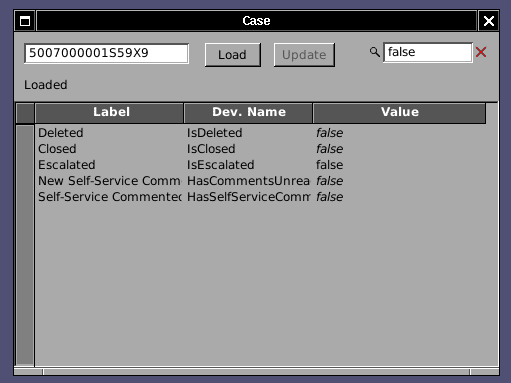
The Object Inspector, the handy tool which allows you to inspect all field values of a record and knowing immediately their developer name given the Object Salesforce Id, how got update powers!


As the Screenshot (here on MacOS) shows, changed values show in a different color (non-updatable fields show in italics and their Cell is not editable). The total number of fields to be changed is summed up in the status field. Only fields marked as changed are updated when the Update button is pressed, other are left as-is and not overwritten for safety.

Further work has been done in the Inspector and full search filtering is now available!
Just entering a a sting will filter out the relevant rows. Both the Field Name or Developer Name are matched, as well as the content! It is thus super-easy to look for all fields (also fields not at layout) which have a certain Value. All fields false? easy as in the screenshot:


Tuesday, May 17, 2016

DataBasin and DataBasinKit 0.9 released

After more than a year of work, finally a new release of DataBasin and its associated framework. This version features a Framework that can be used in threads and the application itself is capable of having concurrent connection classes to SalesForce.com.

On Windows

On OpenBSD


Countless bug fixes (thanks to the bug reports of my colleagues Diego, Moustapha, Matteo + Matteo).

Major new features are:
  • threadable DataBasinKit framework
  • concurrent, interruptible operations (e.g. select vs. update)
  • handle multiple errors as a result of update
  • filter new lines when writing CSVs
  • countless bugfixes, especially in select-identify corner cases

DataBasinKit allows you native connection to SalesForce.com, allowing your application to integrate SOQL queries (SELECT, UPDATE similar operations), be it on Mac (Cocoa) or NetBSD, FreeBSD, OpenBSD, Linux or Solaris as well as Windows (MinGW).
DataBasin itself allows you to perform standard operations in a quick and agile interface: Extract accounts on Linux without the need of Java. Use the unique select-identify feature.

I am proud that Free Software can connect from a Free Software Operating System to a proprietary system and bridge the two worlds, enabling to do administrative work without being constrained to Java on Windows (read: DataLoader). Thanks to the many developers who continue supporting me in the development and keep these fine Operating Systems and tools alive.

Wednesday, March 23, 2016

ProjectCenter debugger changes (now even on windows!)

Behold ProjectCenter running on Windows with the debugger module open and GDB running in it.
 

GNUstep's ProjectCenter debugger module - something which was initiated by Greg and has always been quite experimental and unfinished - was based on running GDB via a virtual terminal by using openpty(). Sadly openpty() is not very portable and also.
I restructuured the debugger module to have a separation between the view handling the visualization and a delegate which handles the actual execution of the debugger and sending commands and receiving output.
Instead of using a terminal I implemented a std-in and std-out mechanism.
While some interactive editing properties get lost when using GDB this way (e.g. ability to answer y/n questions) it is the right way to the a machine interface. For example a stacktrace doesn't get paged but printed out fully. Different data sources now get nicely colored too!

And last but not least, it runs on Windows.

Monday, September 28, 2015

Nasty DataBasin bug fixed

DataBasin's Select-Identify, an invaluable tool for many working with salesforce.com, showed erratic behaviour: extremely hard to reproduce even by sometimes re-running the same query on the same data set, the operation would just stop without any error in the console log, trapped exception or else.

After extensive debugging I found the problem in the queryMore method of the API implementation in DataBasinKit. If queryMore had to return just one record, it would malfunction.
Technically this happened because the size reported by Salesforce.com in the queryMore is not the size of the objects of the queryMore, but of the original query.

The problem affects thus anything using queryMore: If you would select and had a batch size in download of 500, you would get a problem with 501, 1001, 1501 records and so on. 500 or 502 would just work fine. Combine this that the query size of the selectIdentify is dynamic and you get the idea on how difficult it was to reproduce.

Now it is fixed and the upcoming 0.9 version will have this fixed. All currently released DataBasin versions are affected by this bug.